

How to run multiple Claude Code agents in parallel without losing track
One agent is a helper. Four agents working at once is a team — if you set it up right. Worktrees, task sizing, notifications and the layout that keeps you sane.
4 min read

A single coding agent changes how you work. Several running at once changes how much you get done — but only if they are not tripping over each other, and only if you can tell at a glance which one needs you.
This is the setup that works: isolate each agent, give it a task it can finish, get told when it is stuck, and merge the results like any other branch.
Why run agents in parallel at all?
Because most of an agent's time is not your time. While one is running a test suite, reading a codebase or working through a refactor, you are waiting. Run three on independent tasks and the waiting overlaps — you spend your attention reviewing and steering instead of watching a spinner.
The catch: two agents editing the same checkout will corrupt each other's work, and four terminals scrolling at once are impossible to supervise. Both are solvable.
Rule 1: one working tree per agent
Never point two agents at the same folder. Git worktrees give each agent its own checkout of the same repository, on its own branch, sharing one .git directory:
git worktree add ../myapp-search -b feature/search
git worktree add ../myapp-billing -b fix/billing-rounding
Start one agent in each folder. They can edit, build and test freely without touching each other's files. When a branch is merged, clean up with git worktree remove ../myapp-search.
Watch out for shared resources. Two dev servers on the same port, two test runs against the same local database, or two agents running migrations will still collide. Give each worktree its own port and database if it needs one.
Rule 2: size tasks so they can finish
Parallel agents work best on tasks that are:
- Independent — different files, different features, no shared half-finished refactor.
- Verifiable — "make this failing test pass" beats "improve the search".
- Bounded — something you could review in ten minutes.
Good parallel batches look like add an endpoint + write its tests in one tree, fix a reported bug in another, and upgrade a dependency and fix what breaks in a third.
Rule 3: get told when an agent needs you
The real bottleneck is noticing. An agent that has been waiting on a yes/no question for twenty minutes is twenty minutes wasted.
Claude Code supports hooks — shell commands that run on events such as a notification or the agent finishing. A minimal setup sends a desktop notification when an agent stops or asks for input, so you can leave the terminals alone until something actually needs you.
Rule 4: keep the sessions alive
If closing a window kills the agent inside it, you cannot step away. Run agents inside tmux (or anything else that keeps processes alive independent of a window) so you can detach, close the laptop lid on a long task, and come back. We go through the options in how to keep Claude Code running after you close the terminal.
The layout: tabs, tmux, or a grid
Terminal tabs
Free and familiar. Fine for two agents; at four, you are clicking through tabs to find out which one is waiting.
tmux panes
Split one window into panes and see every agent at once:
tmux new -s agents
# Ctrl-b %  split left/right
# Ctrl-b "  split top/bottom
# Ctrl-b o  move between panes
Sessions survive closing the terminal, which solves rule 4 as a bonus. The downside is that you still read scrolling text to work out which pane needs you.
A grid built for agents
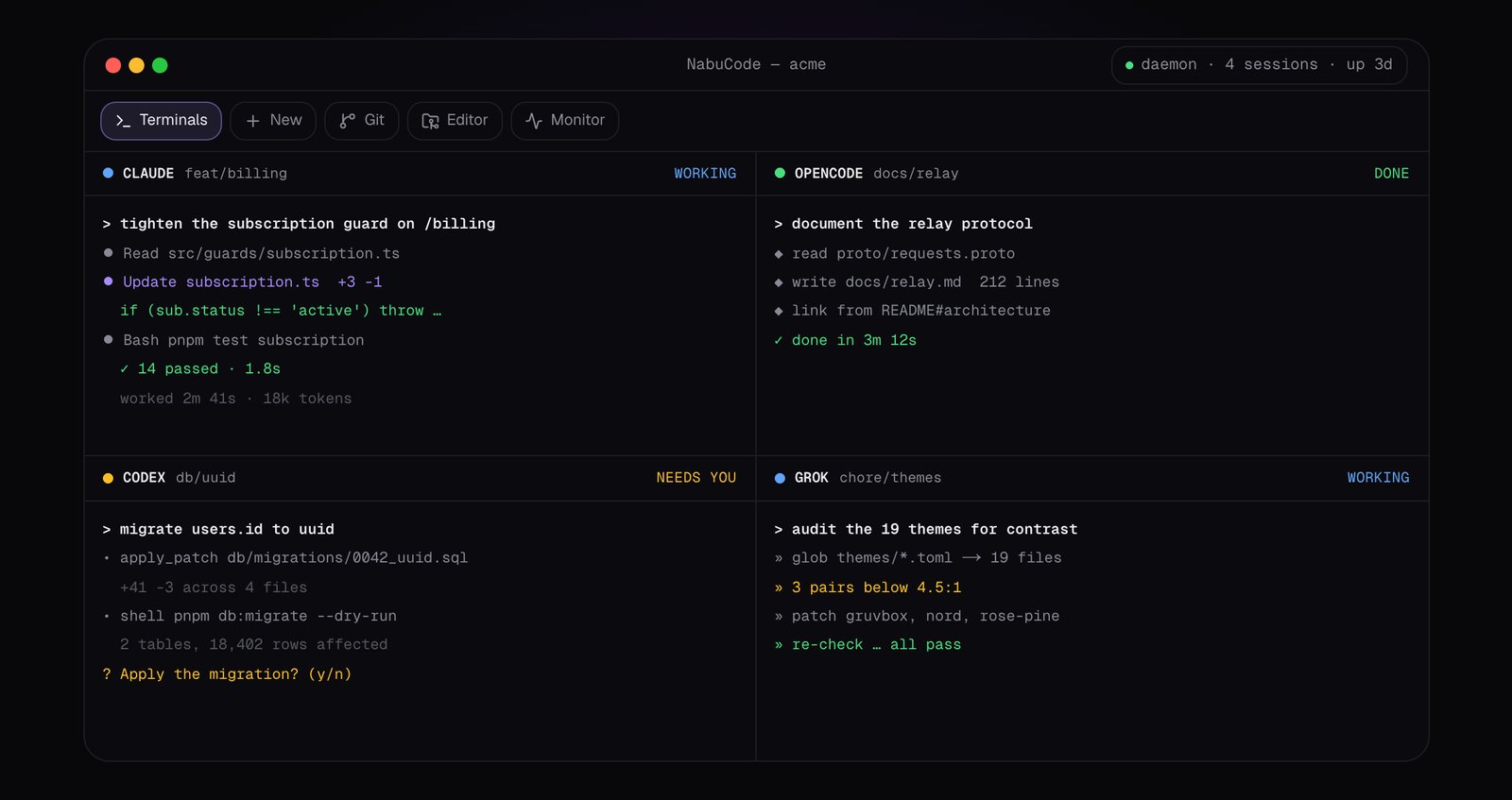
This is why we built NabuCode: a native tiling grid where each pane is an agent session and the state of every pane is visible at a glance.
- Eight panes, one grid. Split, swap, maximise, or drop a session on a zone. Panes that scroll off park in a strip.
- A status light per pane — working, needs you, idle, done or error — built from each harness's own hooks where it has them. You sweep the grid and know where to look.
- Every agent you use. First-class support for Claude Code, Codex, OpenCode and Grok CLI, and a generic mode for the rest.
- A worktree per session, plus presets that start an agent with its prompt, worktree and environment in one click.
- Sessions that outlive the window. A background daemon owns every session — quit the app and the agents keep running.
- Your phone in the loop. The companion app gets the prompts, so you can approve a step from the couch.
Rule 5: merge like a human
Parallel agents produce parallel branches. Treat them the way you would treat a teammate's pull request:
- Read the diff, not the agent's summary of it.
- Run the full test suite on the branch.
- Merge one branch at a time and rebase the others, so conflicts surface early and small.
- Delete the worktree when the branch is in.
Common questions
How many agents can I run at once?
Practically, three to five. The limits are your plan's usage limits, your machine's memory and — most of all — your attention for review. More agents than you can review is just more unreviewed code.
Do I need a separate API key or account per agent?
No. Every session uses your normal Claude Code login; parallel sessions simply consume your usage faster.
The point of parallel agents is not to type less. It is to spend your time on the parts only you can do — deciding what to build and checking that it is right — while the rest happens in the background.