


Designing UI with AI coding agents: give them a canvas, not just a prompt
Agents are great at writing code and bad at guessing what you want it to look like. Letting them design on a live canvas first changes the whole loop.
4 min read

Ask a coding agent to "build a settings page" and you will get one — working, tested, and almost never what you pictured. So you describe the difference in words, it rewrites the code, you run the app again, and you repeat that loop until one of you gives up.
The problem is not the agent. It is that code is a slow medium for visual decisions. Every tweak is a rebuild, every comparison is a screenshot, and you cannot just drag the thing you want moved.
Design first, then code
Human teams solved this long ago: settle the look in a design tool, then build it. The same split works with agents — if the agent can work in the design tool too.
That needs three things:
- A design format the agent can read and write — structured, not pixels — so it can create frames, components and text the way it writes code.
- A canvas you watch live, so you see each screen appear and can step in early.
- A clean path back to code, so the approved design becomes components, not a picture to re-implement by hand.
What the loop looks like
1. Start from something
A blank canvas invites generic output. Start from a template or your existing design system, and tell the agent to match it. Agents follow a concrete reference far better than adjectives like "modern" or "clean".
2. Ask for flows, not screens
Instead of "design a login page", ask for the whole flow: sign in, sign up, forgot password, and the error and loading states for each. The agent lays them out side by side, and the gaps become obvious.
3. Edit alongside it
When the spacing is off or a heading is wrong, fix it yourself on the canvas instead of describing it. Then tell the agent to follow what I changed on the first screen across the rest.
4. Run checks before you build
Text that overflows its box, missing fonts, unknown icons and broken component instances are cheap to fix in a design and expensive to discover in production.
5. Export to code
Once it is approved, generate code from the frames — and let the agent wire it up in your app, now that it knows exactly what "done" looks like.
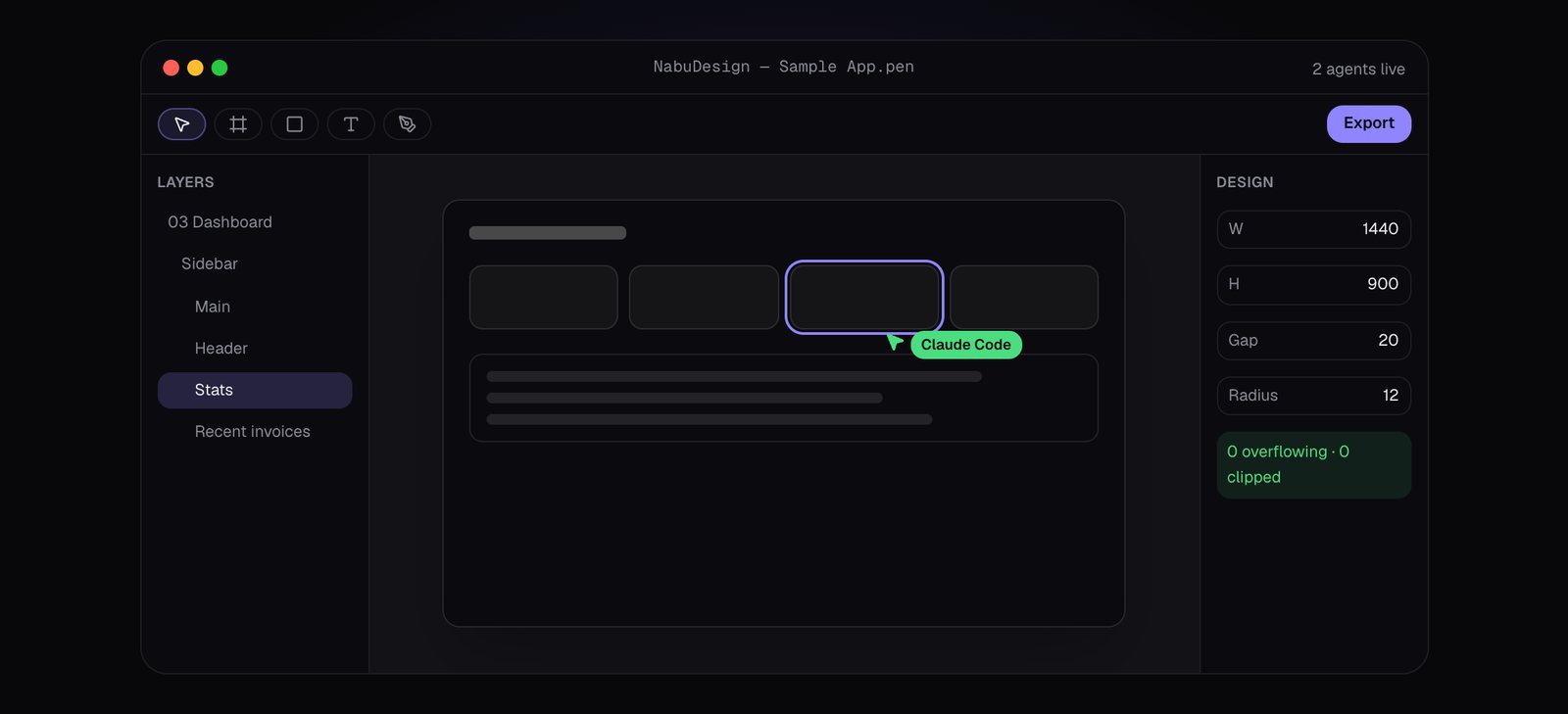
NabuDesign: a canvas your agents can edit
We built NabuDesign for exactly this loop. It is a native Mac design app for .pen design files that Claude Code, Codex and OpenCode build on live while you watch.
- Agents on the canvas. Connect Claude Code, Codex or OpenCode once. Every change they make lands live, labelled with who made it.
- Work side by side. Edit while an agent builds. Each edit is one undoable step, and the history shows whose it was.
- Checks that catch it — overflowing text, missing fonts, unknown icons and broken instances, listed with a one-click fix.
- Libraries included — a shadcn-style UI kit plus iOS and Android parts, themed by mode and accent.
- Templates to start from — dashboards, landing pages, apps and stores, ready to use or to set as the reference agents match.
- Export to code — PNG, SVG and PDF, or HTML with CSS or Tailwind, React and Flutter, from any frame.
Prompts that work well
- "Using the dashboard template as the reference, design a billing page: plan card, invoice table, payment method, and empty and error states."
- "Create the onboarding flow for a habit tracker: four screens, iOS components, dark and light."
- "I changed the card padding and heading size on the first frame. Apply the same changes to every other frame."
- "Run the checks and fix everything except the icon warnings."
Frequently asked questions
Do I need to be a designer?
No. Templates and libraries do the heavy lifting, and you direct the agent in plain language. Designers get a faster first draft; developers get a real design instead of a guess.
Does the plan include AI usage?
You bring your own agent — Claude Code, Codex or OpenCode — on your existing account. NabuDesign is the canvas they work on.
Which Macs does it run on?
macOS 13 or later, on Apple silicon and Intel.
Agents are already good at turning a clear target into code. Give them a canvas to agree on that target with you first, and the code is right the first time far more often.