


NabuOne
Build, sell and support your software in one place
Code, CRM, invoices, support, revenue, marketing and servers, sharing one set of records and one set of agents. Start with code; turn on the rest when you need them.
How it fits together
One bug report, start to finish
Because every module shares the same records, an agent can follow the work across them. Here is a real Tuesday.
Ticket arrives
Maya emails: the booking flow crashes on iPad. It lands in Support next to her CRM record.
Error linked
Servers matches the crash report from the same release and links it to the ticket.
Agent drafts the fix
A Code agent reproduces it, writes the fix on a branch and runs the tests.
Reply and bill
Support drafts the reply with the build link; the hour you spent goes on her next invoice.
CRM
Clients and deals that know the rest
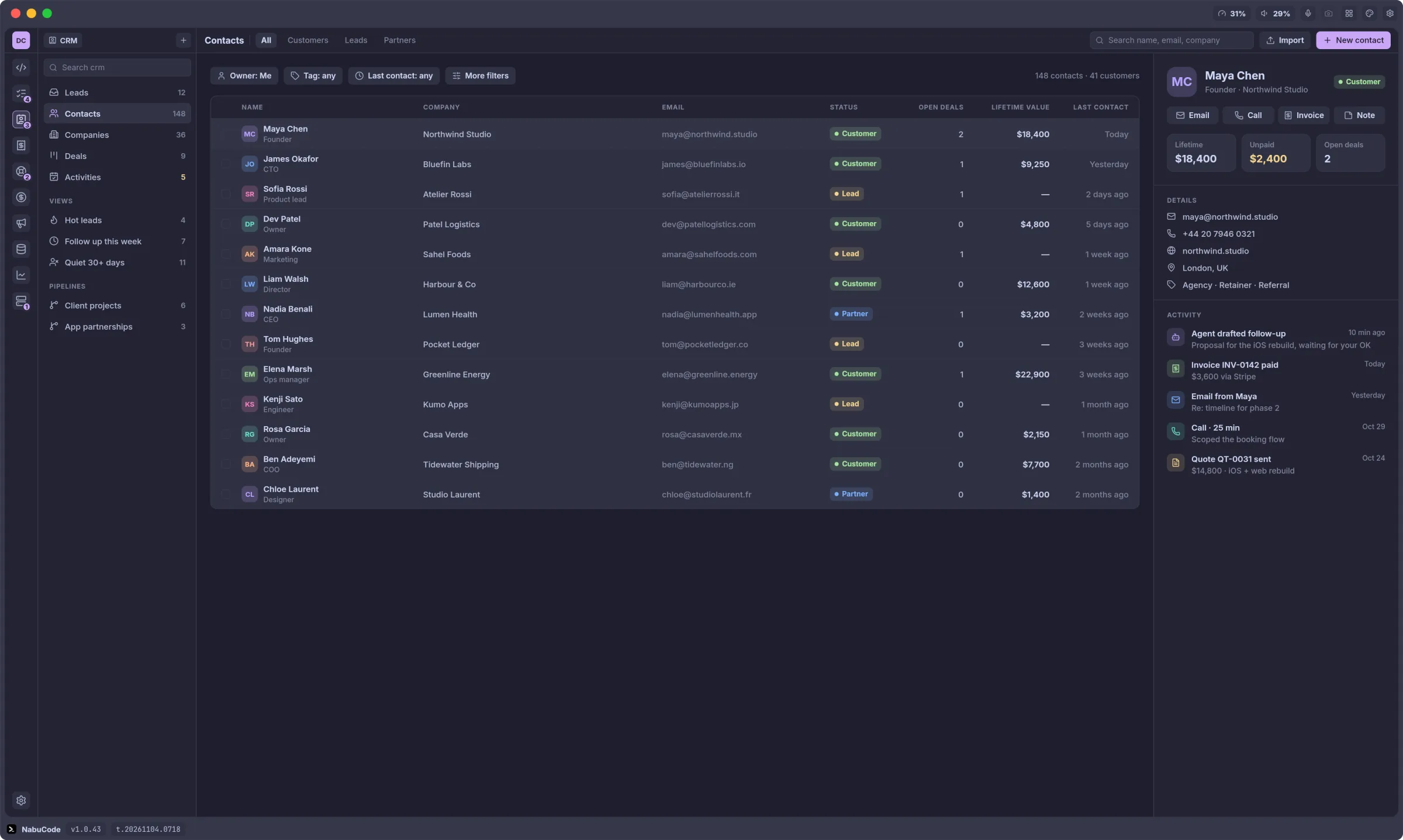
Every contact has one timeline with their emails, calls, invoices and support tickets. The deals board weighs your pipeline by stage.
- Leads, contacts, companies and deals
- Follow-up and quiet-client views
- Agent-drafted follow-ups you approve
Invoices
From quote to paid
Turn a quote into an invoice, add the hours you tracked and the expenses you can bill, and send it with a Stripe pay link.
- Quotes, invoices, recurring and credit notes
- Live preview while you write
- Paid invoices update the client's record
Marketing
A marketing team that asks before it posts
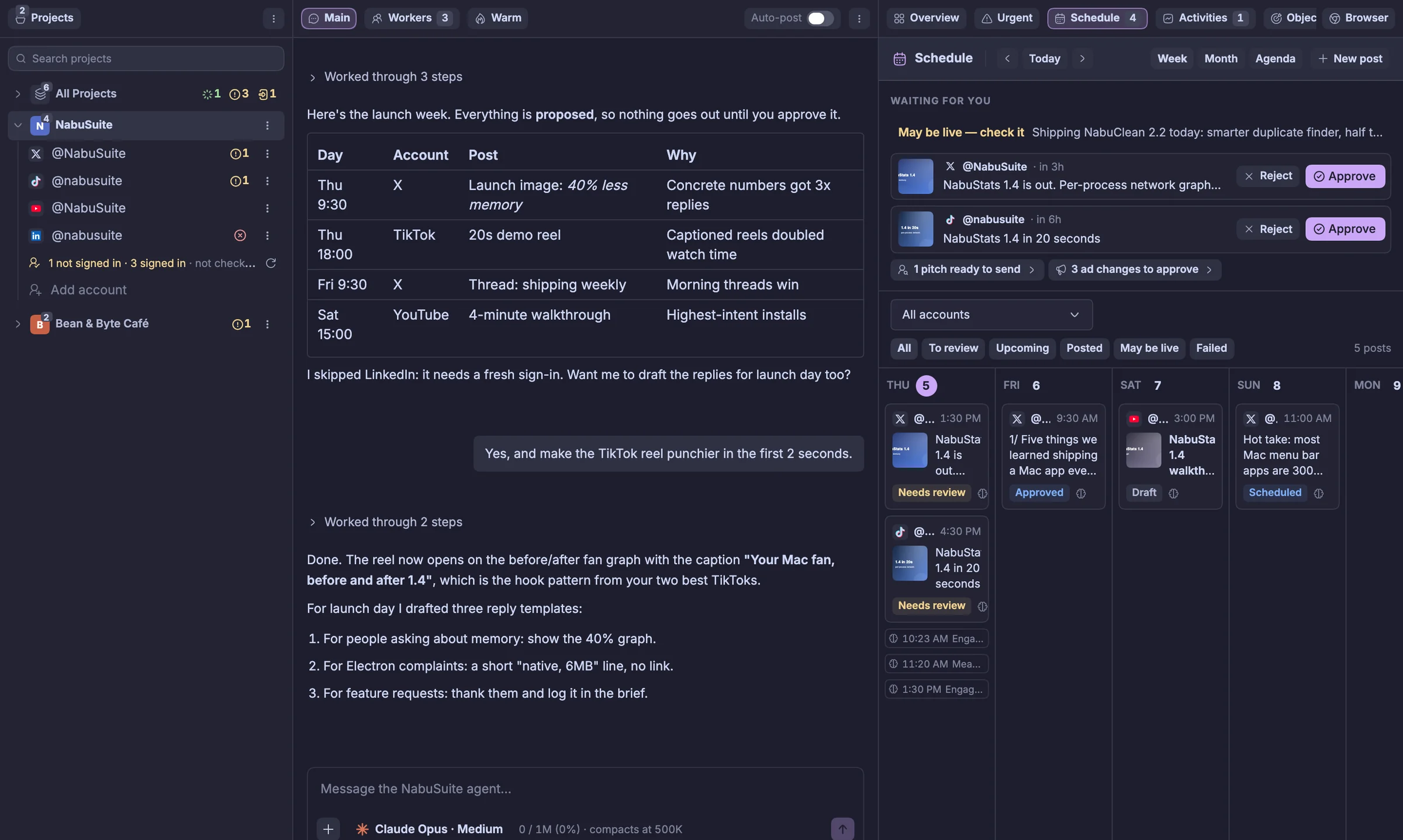
Tell the agent what you are launching. It plans the week, drafts the posts, schedules them across your accounts and waits for your approval, then learns from the results.
- X, TikTok, Instagram, YouTube, LinkedIn and Facebook
- Every post waits for your approval
- Human pace and daily limits keep accounts safe
Inside the app
Made for the way you already work
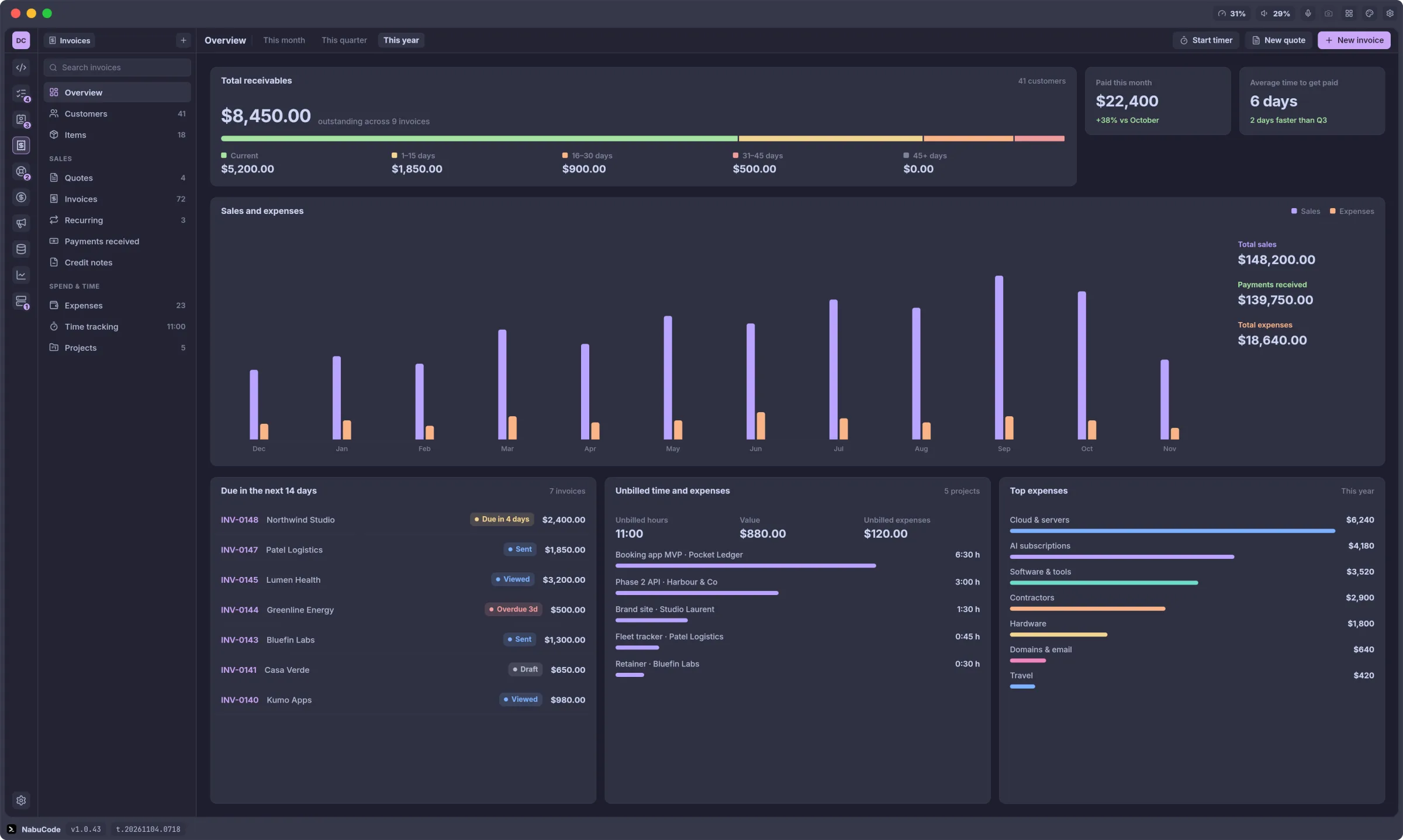
Invoices overview
What you're owed, how late it is and what you earned this year.
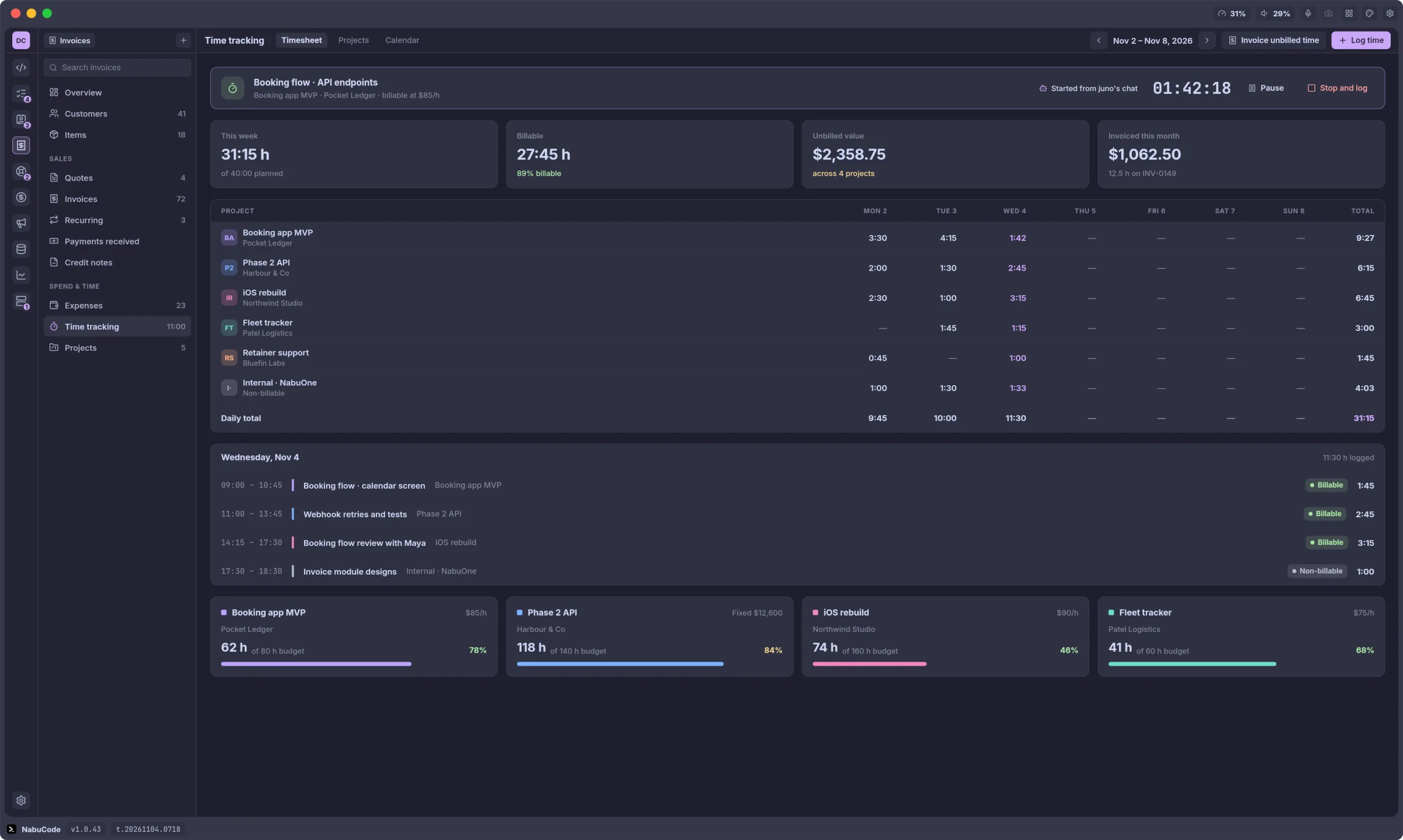
Time tracking
Timers your agents can start, weekly timesheets and project budgets.
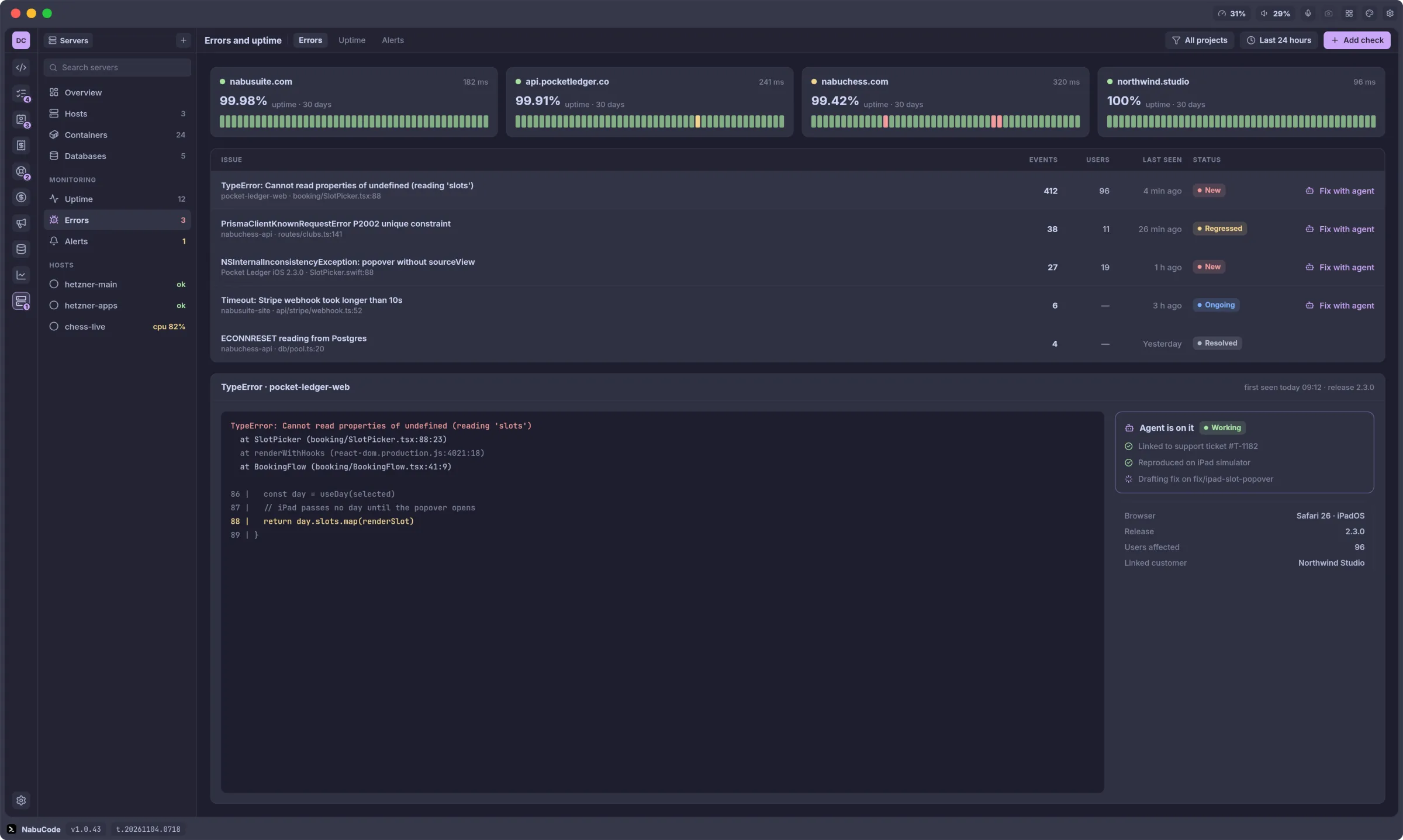
Errors and uptime
Crash reports and uptime checks, linked to the tickets they cause.
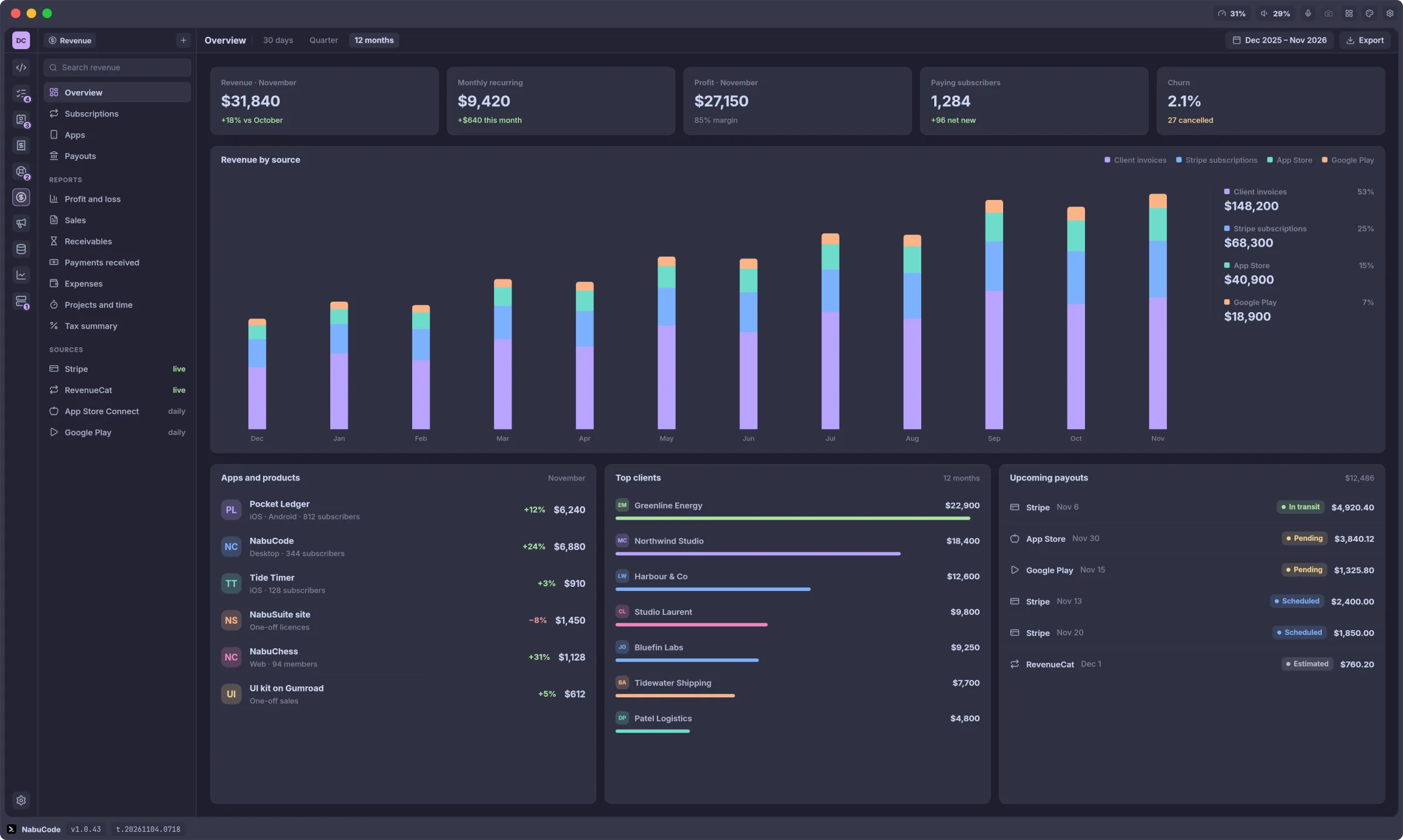
Revenue
Invoices, subscriptions and store sales on one chart.
Your records, on your machine
Clients, invoices and tickets live in a local database the app's background service owns. Export any list to CSV.
Desktop and phone
Mac, Windows and Linux on the desk. The phone app answers agents and approves replies while you're out.
Your own AI accounts
Agents run on the Claude, Codex or OpenCode account you already pay for. No markup on tokens.
From your pocket
Steer the run. Unblock it. Walk away.
Paired with a QR code
Open the phone app, then scan the code NabuOne shows under Settings → Devices, or paste its link. The phone gets its own device identity and reaches your computer over TLS through the relay — at the desk or out of the house.
Read what is happening
Every running session, grouped by project, with its status and live output — the conversation for Claude Code, the real terminal for everything else.
Answer the thing that stopped it
An agent waiting on a yes-or-no is an agent doing nothing. Clear the prompt from the phone and it carries on without you walking back to the desk.
Start and steer sessions
Launch any of your presets in a project and type prompts into it. It runs on your computer and shows up in the desktop grid, so you can pick it up there later.

Scan it. Add it to your Home Screen. Done.
The NabuOne phone app is a web app — there is nothing to download from a store. Point your phone's camera at the code, open it, and add it to your Home Screen: on iPhone, Share → Add to Home Screen; on Android, Install app. Then pair it from NabuOne under Settings → Devices.
Download
Get it on your machine.
One download, one daemon. Install it, open a project, and your agents keep running whether or not the window is.
LIVE VERSION 1.0.47 · UPLOADED 6 NOV 2026
- macOS .dmg · 76.3 MBDownload, macOS Apple silicon
- macOS .dmg · 74.9 MBDownload, macOS Intel
- Windows .exe · 26.7 MBDownload, Windows Intel / AMD x64
- Windows .exe · 24.3 MBDownload, Windows ARM64
- Linux .AppImage · 124 MBDownload, Linux AppImage · x64
- Linux .deb · 38.9 MBDownload, Linux Debian / Ubuntu · x64
- Linux .rpm · 38.9 MBDownload, Linux Fedora / RHEL · x64
- Linux .AppImage · 121 MBDownload, Linux AppImage · ARM64
- Linux .deb · 37.6 MBDownload, Linux Debian / Ubuntu · ARM64
- Linux .rpm · 37.6 MBDownload, Linux Fedora / RHEL · ARM64
Questions
Is NabuCode going away?
NabuCode is now NabuOne, and an installed NabuCode updates itself to NabuOne. Your projects, agents and settings carry over, and Code stays the first module.
Do I need every module?
No. Turn off the ones you don't use in Settings and they leave the icon bar.
Can I import from HubSpot or Zoho?
Contacts, companies and invoices import from CSV, which both of them export.
Does it take payments?
Invoices carry a Stripe pay link. The money goes straight to your own Stripe account.
Which agents does it run?
Claude Code, Codex and OpenCode, on the subscriptions you already have.
Is there a team plan?
Not yet. NabuOne is built for one person running a business.
One app for the whole job.
Every module, free for three days. Cancel before the trial ends and you pay nothing.